# Yacht Git
https://github.com/SelfhostedPro/Yacht

[](https://hub.docker.com/r/selfhostedpro/yacht)
[](https://hub.docker.com/r/selfhostedpro/yacht)
[](https://hub.docker.com/r/selfhostedpro/yacht)
[](https://opencollective.com/selfhostedpro "please consider helping me by either donating or contributing")
 ## Yacht
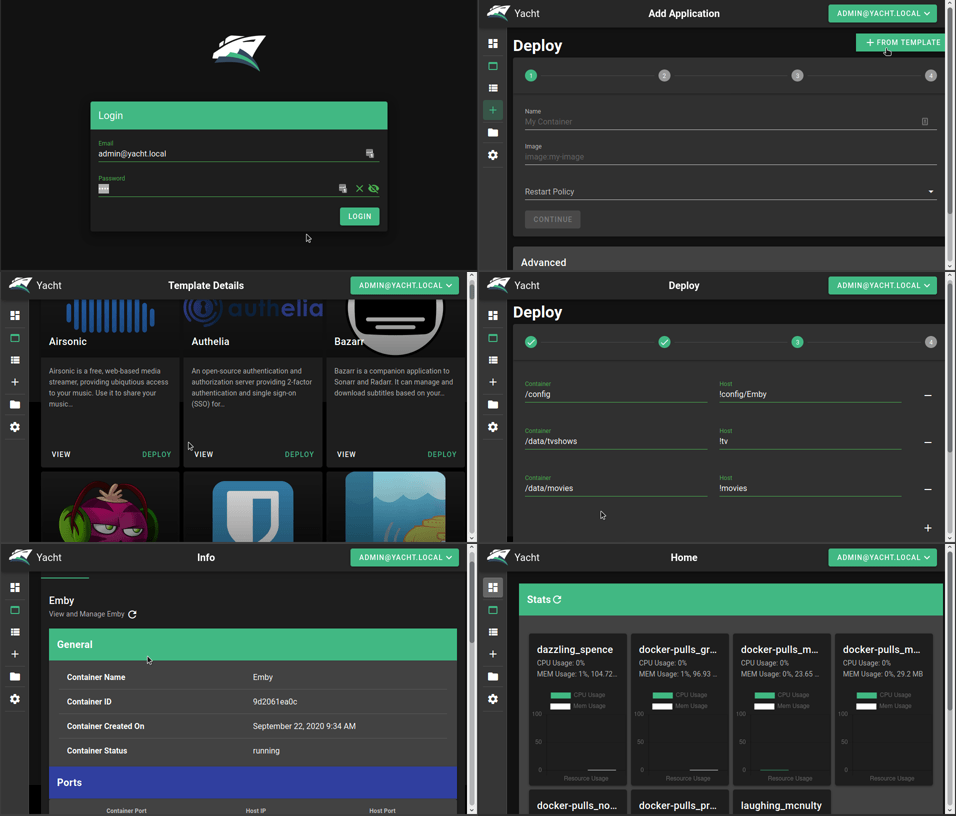
Yacht is a container management UI with a focus on templates and 1-click deployments.
*If the built in update button isn't working for you try the following command:*
```
docker run --rm -d -v /var/run/docker.sock:/var/run/docker.sock containrrr/watchtower:latest --cleanup --run-once
```
## Demo:
## Installation:
Currently only linux has been verified as working but we are open to the idea of supporting windows eventually as well.
**Keep in mind, this is an alpha so the risk of data loss is real and it may not be stable**
Installation documentation can be found [here](https://yacht.sh/docs/Installation/Install).
Check out the getting started guide if this is the first time you've used Yacht: https://yacht.sh/docs/Installation/Getting_Started
**Yacht is also available via the DigitalOcean marketplace:**
[](https://marketplace.digitalocean.com/apps/yacht?refcode=b68dee19dbf6)
**We can also be found on Linode**
[
## Yacht
Yacht is a container management UI with a focus on templates and 1-click deployments.
*If the built in update button isn't working for you try the following command:*
```
docker run --rm -d -v /var/run/docker.sock:/var/run/docker.sock containrrr/watchtower:latest --cleanup --run-once
```
## Demo:

## Installation:
Currently only linux has been verified as working but we are open to the idea of supporting windows eventually as well.
**Keep in mind, this is an alpha so the risk of data loss is real and it may not be stable**
Installation documentation can be found [here](https://yacht.sh/docs/Installation/Install).
Check out the getting started guide if this is the first time you've used Yacht: https://yacht.sh/docs/Installation/Getting_Started
**Yacht is also available via the DigitalOcean marketplace:**
[](https://marketplace.digitalocean.com/apps/yacht?refcode=b68dee19dbf6)
**We can also be found on Linode**
[ ](https://www.linode.com/marketplace/apps/selfhostedpro/yacht/)
## Features So Far:
* Vuetify UI Framework
* Basic Container Management
* Template Framework
* Easy Template Updating
* Centralized settings for volume management and similar QOL functionality.
* Docker-Compose Compatibility
* Advanced Container Management (Edit/Modify)
## Planned Features:
* Container Monitoring
* Easy access to container interfaces
* User Management
* Scheduled Jobs
*If you want something that's not planned please open a feature request issue and we'll see about getting it added.*
## Templating:
Currently Yacht is compatible with portainer templates. You'll add a template url in the "Add Template" settings. The the template will be read, separated into apps, and imported into the database. The apps associated with the templates are linked via a db relationship so when the template is removed, so are the apps associated with it. We store the template url as well so we can enable updating templates with a button press.
We recommend starting with:
```
https://raw.githubusercontent.com/SelfhostedPro/selfhosted_templates/yacht/Template/template.json
```
In templates you are able to define variables (starting with `!`) to have them automatically replaced by whatever variable the user has set in their server settings (ie. `!config` will be replaced by `/yacht/AppData/Config` by default).
## Notes for ARM devices
If you're on arm and graphs aren't showing up add the following to your cmdline.txt:
```
cgroup_enable=cpuset cgroup_enable=memory cgroup_memory=1
```
## Supported Environment Variables
You can utilize the following environment variables in Yacht. None of them are manditory.
| Variable | Description |
| ------------- | ------------- |
| PUID | Set userid that the container will run as. |
| PGID | Set groupid that the container will run as. |
| SECRET_KEY | Setting this to a random string ensures you won't be logged out in between reboots of Yacht. |
| ADMIN_EMAIL | This sets the email for the default Yacht user. |
| DISABLE_AUTH | This disables authentication on the backend of Yacht. It's not recommended unless you're using something like Authelia to manage authentication. |
| DATABASE_URL | If you want to have Yacht use a database like SQL instead of the built in sqlite on you can put that info here in the following format: `postgresql://user:password@postgresserver/db` |
| COMPOSE_DIR | This is the path inside the container which contains your folders that have docker compose projects. (*compose tag only*)|
## License
[MIT License](LICENSE.md)
](https://www.linode.com/marketplace/apps/selfhostedpro/yacht/)
## Features So Far:
* Vuetify UI Framework
* Basic Container Management
* Template Framework
* Easy Template Updating
* Centralized settings for volume management and similar QOL functionality.
* Docker-Compose Compatibility
* Advanced Container Management (Edit/Modify)
## Planned Features:
* Container Monitoring
* Easy access to container interfaces
* User Management
* Scheduled Jobs
*If you want something that's not planned please open a feature request issue and we'll see about getting it added.*
## Templating:
Currently Yacht is compatible with portainer templates. You'll add a template url in the "Add Template" settings. The the template will be read, separated into apps, and imported into the database. The apps associated with the templates are linked via a db relationship so when the template is removed, so are the apps associated with it. We store the template url as well so we can enable updating templates with a button press.
We recommend starting with:
```
https://raw.githubusercontent.com/SelfhostedPro/selfhosted_templates/yacht/Template/template.json
```
In templates you are able to define variables (starting with `!`) to have them automatically replaced by whatever variable the user has set in their server settings (ie. `!config` will be replaced by `/yacht/AppData/Config` by default).
## Notes for ARM devices
If you're on arm and graphs aren't showing up add the following to your cmdline.txt:
```
cgroup_enable=cpuset cgroup_enable=memory cgroup_memory=1
```
## Supported Environment Variables
You can utilize the following environment variables in Yacht. None of them are manditory.
| Variable | Description |
| ------------- | ------------- |
| PUID | Set userid that the container will run as. |
| PGID | Set groupid that the container will run as. |
| SECRET_KEY | Setting this to a random string ensures you won't be logged out in between reboots of Yacht. |
| ADMIN_EMAIL | This sets the email for the default Yacht user. |
| DISABLE_AUTH | This disables authentication on the backend of Yacht. It's not recommended unless you're using something like Authelia to manage authentication. |
| DATABASE_URL | If you want to have Yacht use a database like SQL instead of the built in sqlite on you can put that info here in the following format: `postgresql://user:password@postgresserver/db` |
| COMPOSE_DIR | This is the path inside the container which contains your folders that have docker compose projects. (*compose tag only*)|
## License
[MIT License](LICENSE.md)